Guide
How to claim your ChatGPT business listing
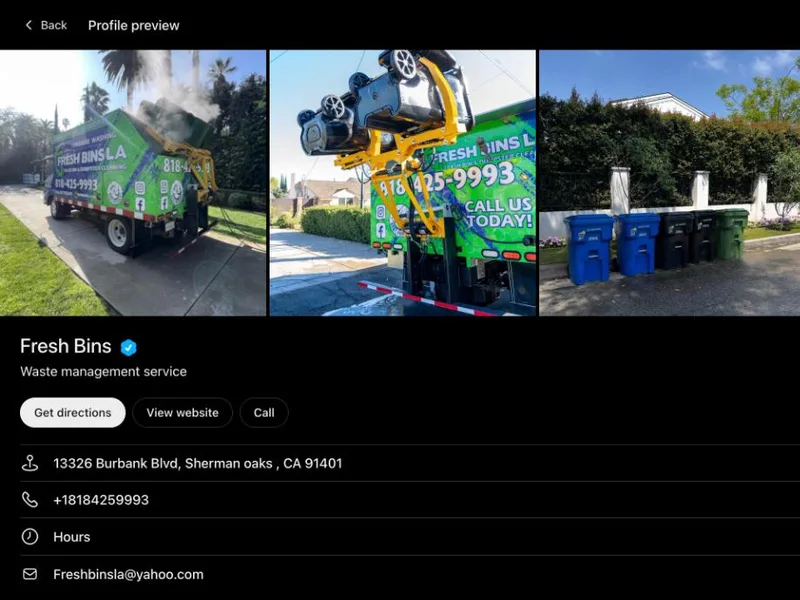
What ChatGPT business listings are
On November 10, 2026, OpenAI opened Businesses in ChatGPT as a beta. It works a lot like Google Business Profile, but for ChatGPT: you claim your business, prove you own it, and then control the details ChatGPT shows about you, like your category, description, phone, website, photos, address and hours. You also get a dashboard that shows how often ChatGPT mentions you.
OpenAI says 1.2 billion people use ChatGPT every week. When a business comes up in an answer, people can click through to that business's ChatGPT profile. That profile is what you're claiming here. And under OpenAI's terms, ChatGPT can show a listing for your business whether you claim it or not, so the real choice is whether you control it.
It matters because customers have started asking ChatGPT the same things they used to type into Google: "who cleans trash cans in Sherman Oaks?", "how much does bin cleaning cost near me?", "is a monthly bin cleaning plan worth it?". When ChatGPT answers with local businesses, it pulls from information like this. A claimed listing is how you make sure it gets yours right.
Honest status: it's brand new and a lot isn't clear yet. OpenAI says joining shouldn't change how often you show up. But it also says accurate details help ChatGPT bring you up in more relevant conversations. For a bin cleaner who wants to stand out when customers search with AI, it's free, it takes about 20 minutes, and very few of your competitors have done it yet. That's a good trade.
Below is the exact walkthrough, with screenshots from the listing we set up for Fresh Bins LA.
Before you start: what you need
- A ChatGPT account. The free plan works: ours is on Free. You don't need ChatGPT Plus or a ChatGPT Business plan.
- A government photo ID for the owner (or someone authorized to represent the business).
- Your EIN, the business's federal tax ID. If you don't have one, you can get one free in a few minutes at IRS.gov.
- Your business name, phone, website and address exactly as they appear on your Google profile and website.
- Your hours, your per-bin prices, and 5 to 10 real photos: truck or trailer, crew, before-and-afters.
Do it on a computer. The editing screens are easier on a big screen than on your phone.
Step 1: Find "Business" in ChatGPT
Sign in at chatgpt.com. In the left sidebar, click Explore (the "···" item), then Business. You can also go straight to chatgpt.com/business-hub.
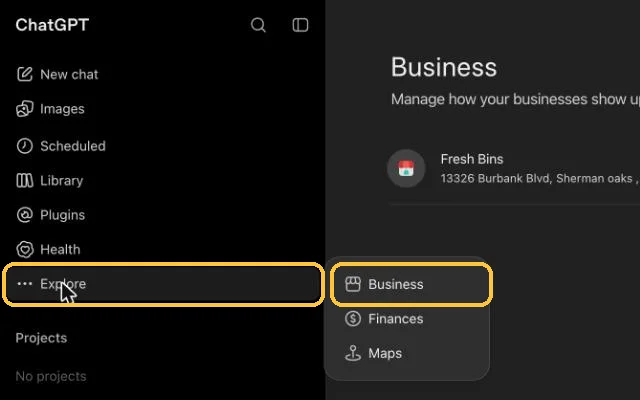
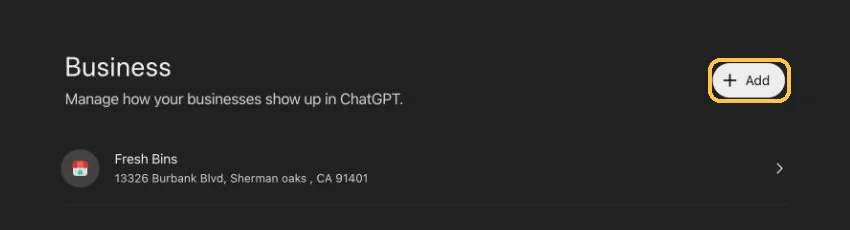
This opens the Business hub: "Manage how your businesses show up in ChatGPT." The first time, the list is empty. Click + Add in the top right.
Step 2: Search for your business and claim it
Type your business name in the search box. ChatGPT lists businesses it already knows about, usually pulled from map data, plus a Create option at the top.
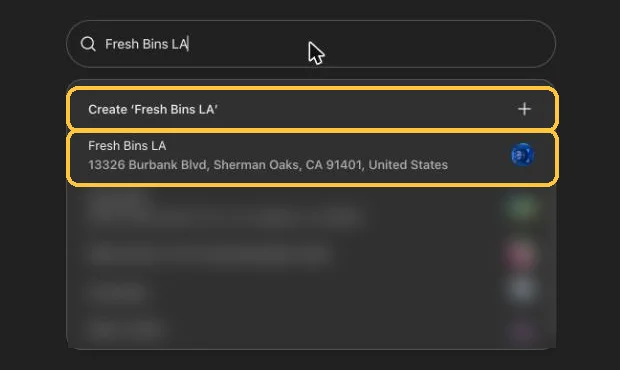
- If your business shows up, pick it, even if some details are wrong. You'll fix them after you verify. Claiming the existing listing avoids a duplicate.
- Check the address before you click. Lots of bin cleaners have similar names ("Fresh Bins", "Clean Bins", "Bin Bros"). Make sure it's yours, not a company in another city.
- Use "Create" only if you're not listed, and type your name exactly as it appears on your truck, website and Google profile.
The bottom of this screen says that by continuing you accept OpenAI's Businesses in ChatGPT Terms. Give them a read.
Step 3: Verify that you own the business
Before ChatGPT lets you edit anything, it checks that you're really the owner. When we claimed Fresh Bins LA, it asked for two things:
- Your ID. A government photo ID for the owner. Use the person whose name is on the business paperwork.
- Your EIN. The business's federal tax ID number. It needs to match the legal business name the IRS has on file. You'll find it on your IRS EIN letter (CP 575) or on past business tax returns.
Verification may look different for your business. Others have reported a text or call to the main business phone number, or adding a record to their website's domain. OpenAI hasn't published the exact rules, and says they can vary by industry. Use whatever it asks you for.
Tips so it goes through the first time:
- Use the same business name everywhere: ChatGPT, Google, your website and your IRS paperwork. A DBA or "LLC" mismatch is a common snag on any listing site.
- Take the ID photo in good light, flat, with all four corners showing.
- Once you're verified, a blue check appears next to your business name. It means the listing is claimed. It doesn't mean OpenAI checked every detail you entered, so keeping them right is on you.
Step 4: Your dashboard, explained
After you're verified, your business opens to the Overview. Here's what everything on it means.
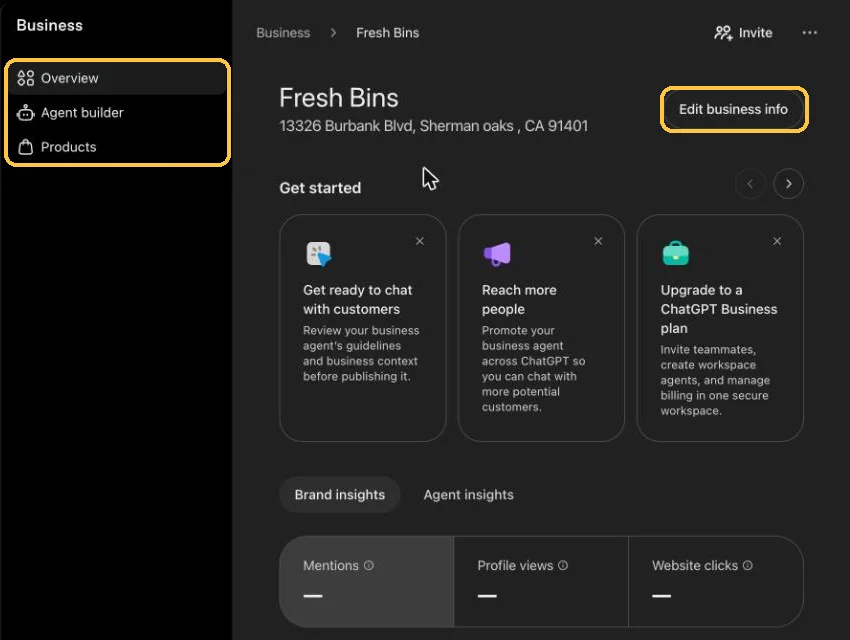
| What you see | What it means |
|---|---|
| Overview | Your dashboard: insights, website status and discovery topics. |
| Agent builder | A chat assistant for your business that customers can talk to inside ChatGPT. It's rolling out to online stores first. For Fresh Bins it says "isn't available yet… It'll be available for your business soon." |
| Products | Where you upload your plans and prices (Step 6). |
| Edit business info | Opens the listing details: About, Contact, Photos, Location, Hours (Step 5). |
| Invite | Gives a teammate or your marketing person access, so you never share your login. |
| ··· menu | "Add business" for a second location or company, and "Provide feedback" to OpenAI. |
| Get started cards | Suggestions from ChatGPT: set up an agent, promote it, upgrade to a ChatGPT Business plan. None of them are required for your listing. You can close them. |
Brand insights: the three numbers
ChatGPT explains each number in a tooltip. In plain words:
- Mentions: "Number of times your business appeared in ChatGPT responses, including citations." This is your visibility number.
- Profile views: "Number of times people opened your business profile in ChatGPT." Someone saw you and wanted more.
- Website clicks: "Number of recorded clicks on links to your website in ChatGPT. Clicks don't confirm website visits or conversions." Treat it as interest, not sales.
Switch between the last 7 days (7D) and 28 days (28D) in the top right of the insights. Agent insights (conversations, multi-turn conversations, product clicks) only fill in once your business has an agent.
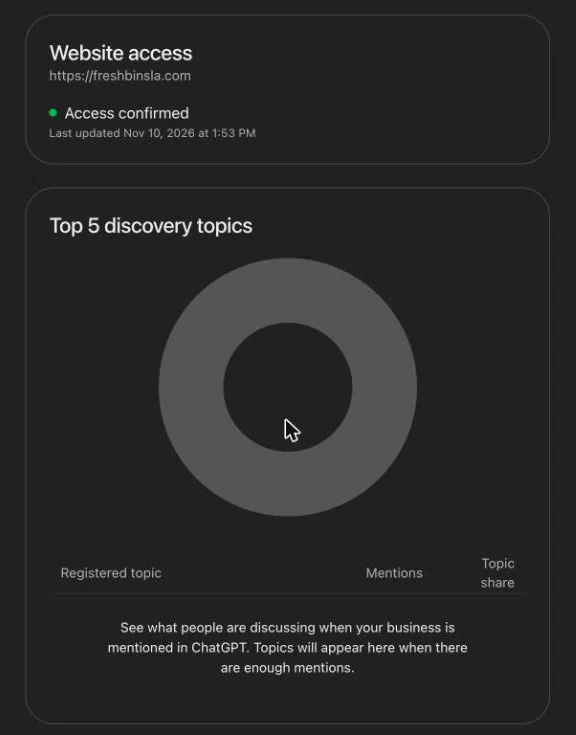
- Website access shows the website tied to your listing and whether access is confirmed. Ours shows "Access confirmed" for freshbinsla.com.
- Top 5 discovery topics will show what people are talking about when ChatGPT mentions you, like pricing, sanitizing or a specific city. That's a goldmine for what to put on your website and in your ads. You see themes, not anyone's actual chats.
Expect the dashboard to be blank at first. Every number shows "—" until there's enough activity. ChatGPT holds back small counts for privacy. That's normal. Check back monthly.
Step 5: Fill out every detail
Click Edit business info. There are five tabs. Fill out every one. A half-empty listing gives ChatGPT less to match you on.
About: category and description
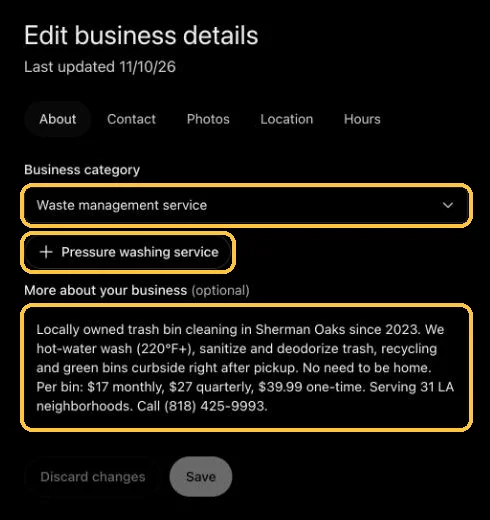
Business category. There's no "bin cleaning" category yet. We searched the list: the "clean" options are carpet, commercial, dry cleaner, house and window cleaning, and none of those fit. You only get one category on ChatGPT, so pick the closest fit. We picked Waste management service. ChatGPT may show a suggestion under it (for Fresh Bins it showed "Pressure washing service"), but you can't add a second category the way you can on Google. Put the rest of what you do (sanitizing, deodorizing, dumpster pads, pressure washing) in your description instead.
More about your business. This is optional, but it's where you tell ChatGPT what you actually do. Write it like you'd explain it to a neighbor, in four or five short sentences:
- What you clean: trash, recycling and green waste bins.
- Where: your home base and how many neighborhoods you serve.
- How: curbside, right after trash pickup, hot water, sanitize, deodorize, no need to be home.
- What it costs: your per-bin prices.
- How to book: your phone number.
Fresh Bins LA's reads: "Locally owned trash bin cleaning in Sherman Oaks since 2023. We hot-water wash (220°F+), sanitize and deodorize trash, recycling and green bins curbside right after pickup. No need to be home. Per bin: $17 monthly, $27 quarterly, $39.99 one-time. Serving 31 LA neighborhoods. Call (818) 425-9993."
Use the words customers use: "trash can cleaning", "bin cleaning", "garbage can". Skip hype like "best in town", and don't stuff it with city lists.
Contact: phone, email, website
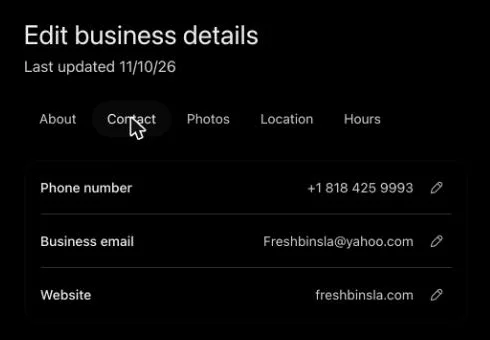
- Phone: the same number as your Google profile and website, so a customer who calls it reaches you.
- Business email: one you actually check.
- Website: your main site. If you have a page with prices and online booking, that's the page that turns ChatGPT traffic into customers. See the website checklist.
Photos: real work only
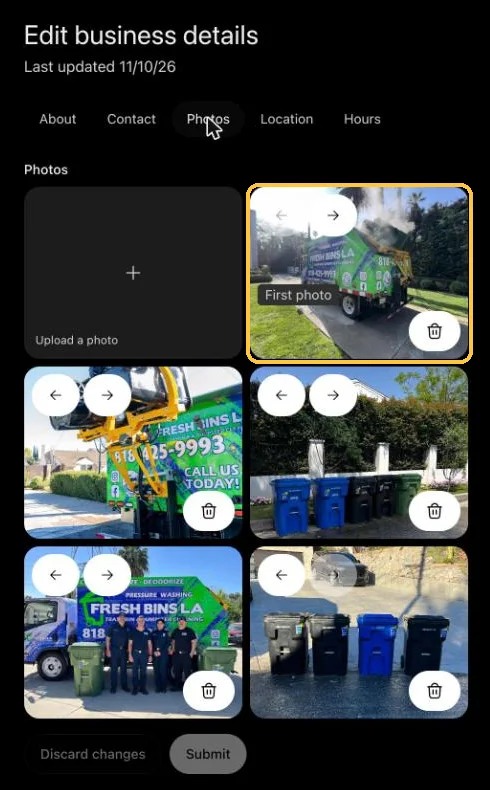
- Upload 6 to 10 real photos: your truck or trailer, a clean row of bins at the curb, your crew in uniform, and a before-and-after inside a can.
- The first photo leads your listing. Put your best truck or before-and-after shot first. Use the arrows to reorder.
- No stock photos, no AI images, no text-heavy flyers.
- This tab uses Submit, not Save. Click it, or your photos won't go through.
Location
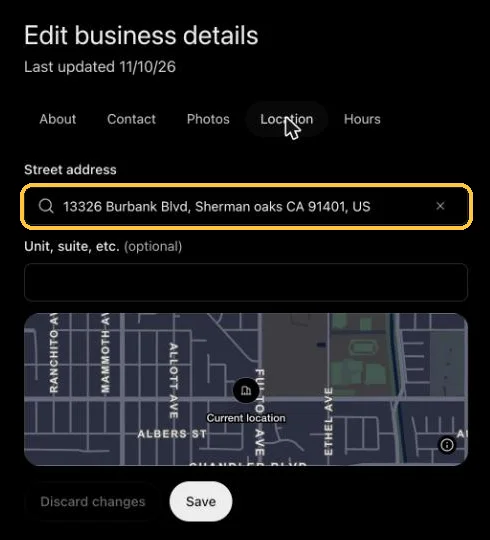
Enter your business address and check the pin on the map. One warning for home-based bin cleaners: we didn't see a way to hide the address or list only a service area, like you can on Google, and the finished listing shows a "Get directions" button. If you run the business from home, decide whether you're comfortable with that address being public before you save it.
Hours
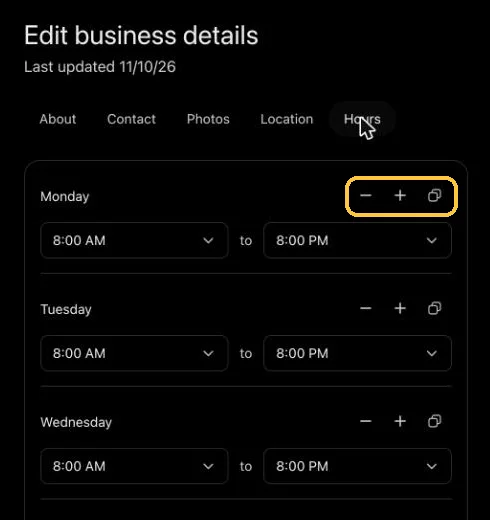
Set real hours for when someone answers the phone or replies to messages, not when the truck is out. Scroll down to set your time zone, then click Save. If you're closed a day, clear it. Don't leave it showing as open.
Step 6: Add your plans as "products"
The Products section was built for online stores, but it works for service plans too. Each plan you sell (monthly, quarterly, one-time) becomes one "product" with a price, so ChatGPT can answer "how much does bin cleaning cost" with your prices.
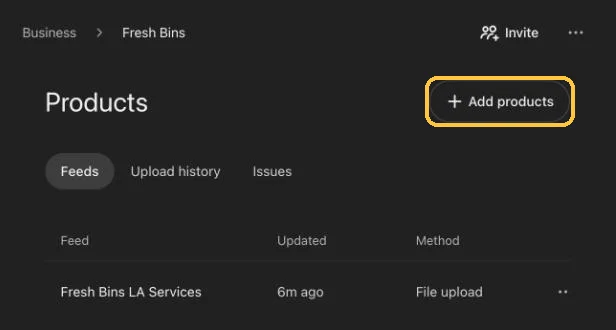
Click + Add products, give the feed a name (optional), click Next, and pick how to send it:
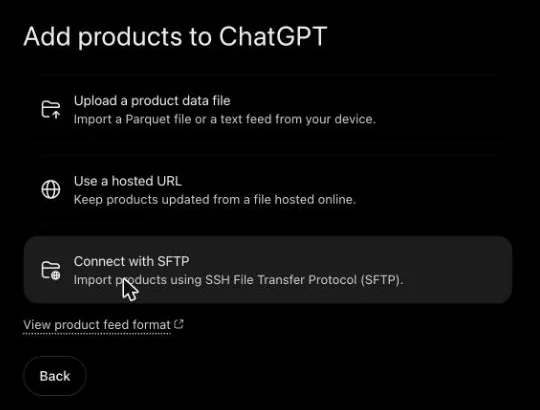
- Upload a product data file: the simplest. Accepted formats are Parquet or a compressed text feed (JSONL, CSV or TSV, gzipped), saved as UTF-8.
- Use a hosted URL: a file on your website that ChatGPT re-reads, so price changes update on their own.
- Connect with SFTP: for bigger stores. You don't need it.
Here's one line from the type of file that processed for Fresh Bins LA, with the business swapped for a made-up one. One line per plan. "Price" is per bin.
{"item_id": "MONTHLY", "title": "Monthly Trash Bin Cleaning (per bin) - Your City",
 "description": "Curbside trash bin cleaning every 4 weeks, right after pickup. Hot-water wash, sanitize and deodorize. Trash, recycling and green bins. No need to be home.",
 "price": "25.00 USD", "url": "https://yourwebsite.com/pricing",
 "image_url": "https://yourwebsite.com/photos/truck.jpg",
 "brand": "Your Company", "seller_name": "Your Company", "seller_url": "https://yourwebsite.com",
 "product_category": "Services > Home Services > Trash Bin Cleaning",
 "availability": "in_stock", "condition": "new", "is_eligible_search": true,
 "target_countries": ["US"], "store_country": "US"}
The full field list is in OpenAI's product feed format (linked from the upload screen as "View product feed format"). After you upload, check the Upload history tab for "Processed" and the Issues tab for anything it rejected. When your prices change, upload a new file the same day.
Step 7: Preview your listing
On the Edit business details screen, click the eye icon in the top right. That's how your listing looks to customers in ChatGPT.
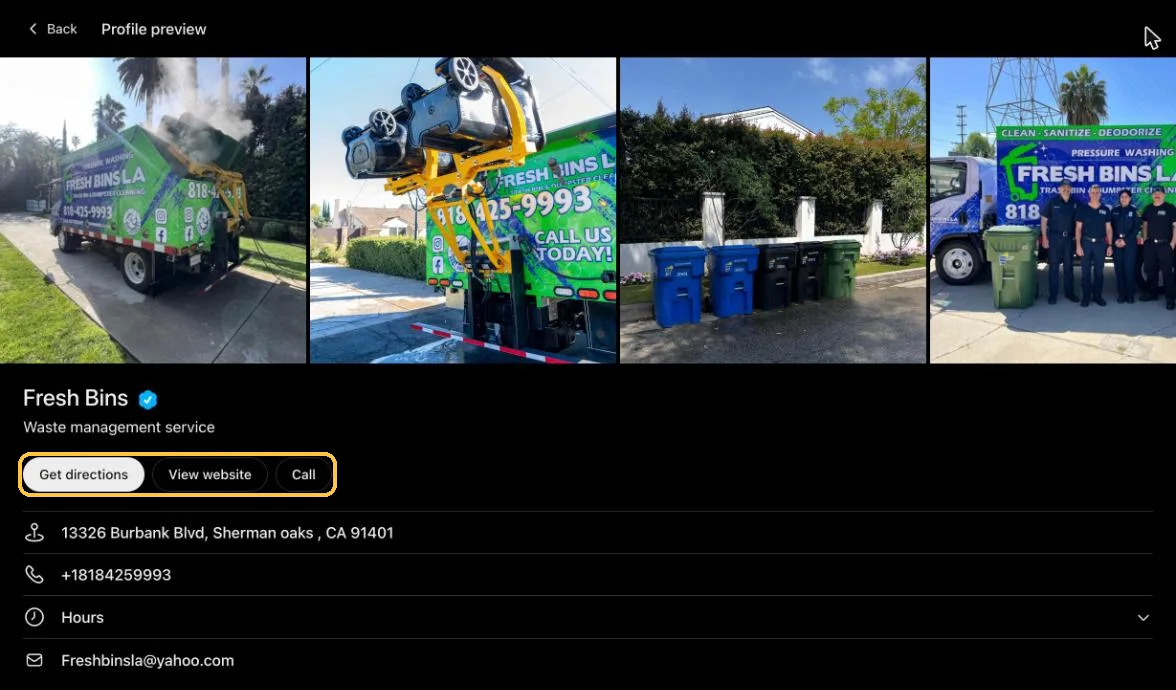
Check it the way a customer would: tap Call (right number?), View website (right page?), open Hours (right days?). Fix anything off right away. OpenAI says listings can also include information from other sources, so look it over again after a few days.
The fine print, in plain English
We read OpenAI's Businesses in ChatGPT Terms so you don't have to. Here's what matters for a bin cleaner:
- ChatGPT may call your business. By using Business Hub, you agree that ChatGPT's assistant can call you on a customer's behalf, for example to ask about your hours or to book. For most bin cleaners that's a lead calling, so answer it like any other. If you'd rather not get these calls, enter your number at realtime.chatgpt.com/stopcalls.
- You don't fully control the listing. OpenAI can add to or change your details from other sources, and doesn't promise to show everything you submit. That's why you check the preview regularly.
- Public basics are permanent. OpenAI's right to show the basic info you submit for display (name, address, phone, category, hours, website) can't be taken back later. Another reason to think before entering a home address.
- Product feeds require crawler access. If you upload products, you agree to let OpenAI's crawlers access your website.
- No guarantees. OpenAI doesn't promise any placement, traffic or sales.
- Insights are confidential. You can share them with people working for you, like your marketing agency, but not post them publicly.
Best practices for bin cleaners
- Match your Google profile exactly. Same name, phone, website and hours on ChatGPT, Google and your website. AI tools cross-check sources, and mismatches cost trust.
- Use your real business name. No "Bin Bros Trash Can Cleaning Best in Dallas". Keyword-stuffed names get listings suspended on Google, and there's no reason to expect better here.
- Put prices everywhere ChatGPT looks: the description, the product feed, and in plain text on your website. "How much does bin cleaning cost" is one of the most common questions, and the business with a clear answer gets mentioned.
- Your website still does the heavy lifting. ChatGPT reads the web. A page for each city you serve, prices in text (not just in a picture) and real reviews all help. Make sure your site doesn't block OpenAI's search crawler (OAI-SearchBot) in its robots.txt file.
- Keep getting Google reviews. Reviews are some of the most-read signals about a local business anywhere online. The Google Business Profile guide covers how.
- Update it like your Google profile: new photos every few weeks, and new hours or prices the day they change.
- Check your insights monthly. Once discovery topics appear, use them. If people mention you with "sanitizing" or "monthly plan", lead with that on your website and in your ads.
- Use Invite, not your password. Give your marketer or office manager their own access.
- Ignore anyone selling "#1 in ChatGPT". Nobody can promise that. OpenAI itself says claiming doesn't guarantee placement.
What’s still unclear
This launched as a beta on November 10, 2026. Here's what nobody knows yet:
- Exactly how listings affect recommendations. OpenAI says joining shouldn't change how often you appear, but accurate details can help ChatGPT bring you up in more relevant conversations.
- When the business agent comes to local service businesses. It's starting with U.S. online stores and online services.
- Whether it stays free. It's free now. OpenAI hasn't ruled out charging later.
- The exact verification rules, and how long insights data is kept.
We'll update this guide as it changes. For now, the move is simple: claim it, fill out every field honestly, and keep it as current as your Google profile.
Sources: our own setup of Fresh Bins LA's listing on Nov 10, 2026; OpenAI: Introducing Businesses in ChatGPT; Digiday; Search Engine Roundtable; DataStudios; OpenAI product feed spec.
Print the free workbook
Worksheet 10 checks that your name, phone and website match on ChatGPT, Google, Bing, Apple, Yelp and the rest.
Want this done for you?
We set this up for bin cleaning companies for $230 a month.
More guides
Keep reading
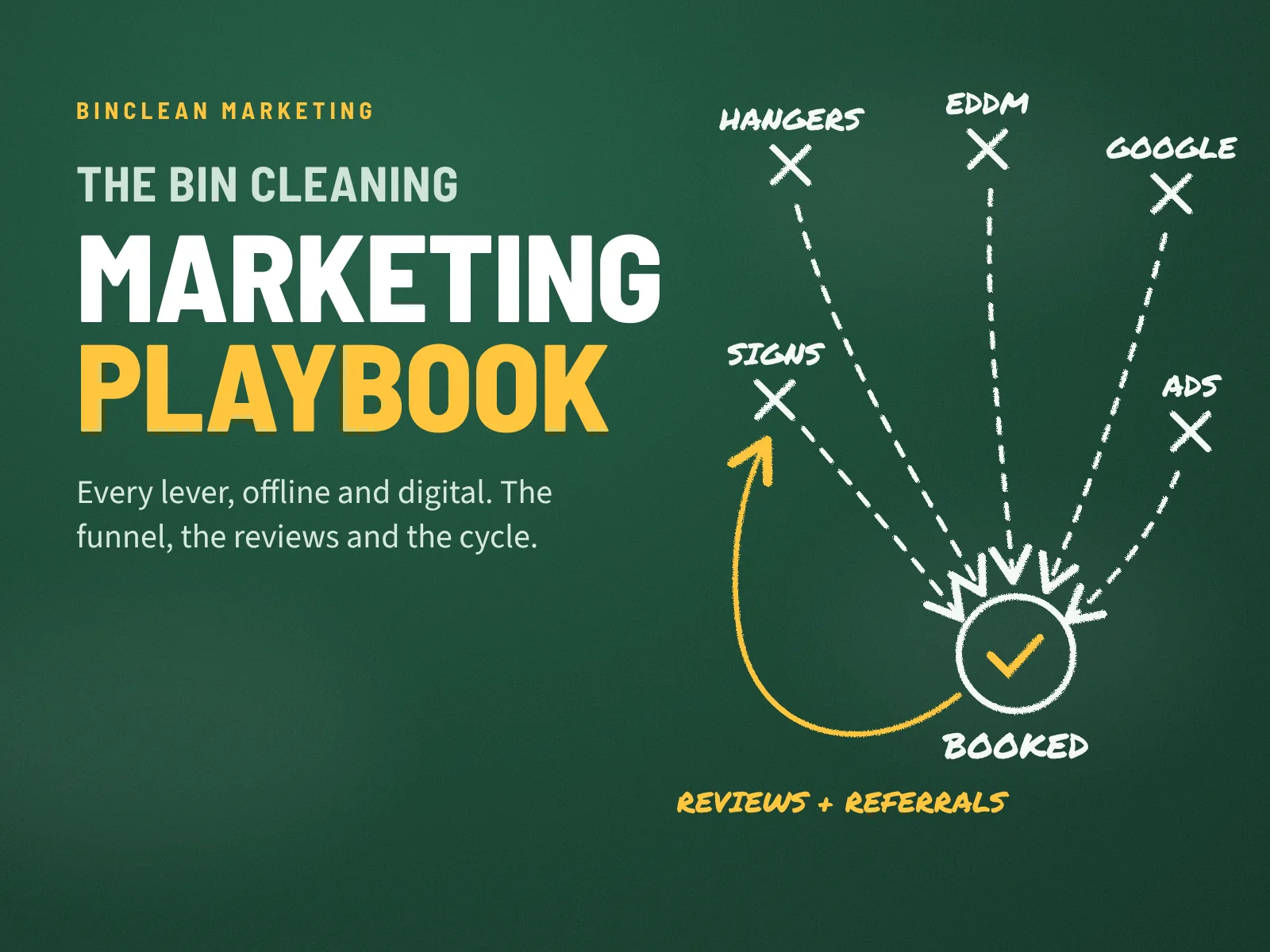
How to market a bin cleaning business: the whole playbook
New: the funnel, reviews, and every offline and digital lever, from EDDM and door hangers to Google Ads, with real numbers.
Read more →
Bin cleaning website checklist
15 things a bin cleaning website needs before you spend a dollar on ads.
Read more →
How to set up your Google Business Profile
Updated: every step with screenshots, from creating and verifying it to services, posts and reviews.
Read more →Questions
Common questions
Is a ChatGPT business listing free?
Yes, at launch. Claiming, editing and insights are free, and it works with a free ChatGPT account. OpenAI hasn’t ruled out charging for some features later.
How do I find the business listing in ChatGPT?
Sign in at chatgpt.com, click Explore in the left sidebar, then Business. Or go to chatgpt.com/business-hub. Click + Add, search your business name, and claim it.
What do I need to verify my business on ChatGPT?
When we claimed a bin cleaning company, ChatGPT asked for the owner’s government photo ID and the business’s EIN. Others have reported verifying by a text or call to the business phone, or through their website’s domain. OpenAI says methods can vary.
Will claiming my ChatGPT listing get me more customers?
OpenAI says claiming doesn’t guarantee placement, but accurate details help ChatGPT match you to relevant questions. Think of it like a Google Business Profile: it’s the baseline that makes sure ChatGPT has your correct prices, phone, hours and service area.
Is there a bin cleaning category in ChatGPT?
Not yet. We used Waste management service. You only get one category on ChatGPT, so put everything else you do in your description. The other “cleaning” categories are for carpet, commercial, dry, house and window cleaning.
Will ChatGPT call my bin cleaning business?
It can. OpenAI’s terms say that by using Business Hub, you agree ChatGPT’s assistant may call your business on a customer’s behalf, for example to ask about hours or to book. You can stop these calls at realtime.chatgpt.com/stopcalls.
Can I hide my home address on my ChatGPT listing?
We didn’t find a service-area or hide-address option, and the listing shows a Get directions button. If you work from home, decide whether you’re comfortable showing that address before you save it.
Book a demo
See how it works on a call.
Pick a time on Taylor’s calendar. We’ll look at your Google profile, website and booking setup with you, show you how Clean Bin System runs sign-ups, routes and billing, and tell you what we’d fix first. No cost, no pressure.
On the call
- Your Google profile and website, and what’s costing you bookings
- Clean Bin System: online sign-ups, routes built around trash day, and card billing that runs itself
- What it would cost you, and how soon you could be live