Guide
How to set up your Google Business Profile
Why this is the first thing to fix
When someone searches "trash can cleaning near me", the first local results they see are usually the map results, and those come from Google Business Profiles. Your profile is where people see your reviews, call you, and click through to book. It's free, and it's often the first thing a new customer sees.
Google ranks local results on three things: relevance (how well your profile matches the search), distance, and prominence (how well known you are, which includes reviews). You can't change distance. You control relevance by filling out your profile completely and correctly, and you build prominence with reviews and a website that backs it all up. Google says it plainly: "The categories you select affect your local ranking on Google."
Here's what that looks like for a real bin cleaner. From June to early November 2026, South Bay Bin Cleaners, a client of ours in the South Bay area of Los Angeles, had 2,113 people view its profile, and that turned into 47 calls, 11 text chats and 281 clicks to its website. That's from a free listing.
Below is the full walkthrough: creating the profile, verifying it, and then every screen you'll use after that. The screenshots come from Google's setup screens and from the live profiles we manage for South Bay Bin Cleaners and Zafra Trash Bin Cleaning. Other businesses and reviewers are blurred.
Before you start: what you need
- A Google account the business owns and will keep, like the owner's Gmail. Not your marketer's account. You can give other people access later without sharing your password.
- Your business name exactly as it appears on your truck or trailer, your website and your paperwork.
- A phone number you answer. If Google verifies by call or text, a phone menu (IVR) won't receive the code.
- Your website, ideally the page that shows prices and books online.
- The cities or ZIP codes you serve. You get up to 20.
- Your hours, your services and your per-bin prices.
- Your logo and 5 to 10 real photos: truck or trailer, crew, clean bins at the curb, before-and-afters.
- Your phone, charged, and your branded trailer or truck nearby, in case Google asks for a verification video.
Check first that you're not already on Google. Search your business name on Google Maps. If a profile already exists, claim it instead of making a second one (Step 1 covers how). Google doesn't allow duplicate profiles, and they split your reviews.
Do the setup on a computer. You'll need your phone for verification, and the edit screens look about the same on both.
Step 1: Start your profile and enter your name
Go to business.google.com/add and sign in with the business's Google account. The first screen is "Start building your Business Profile". Start typing your business name.
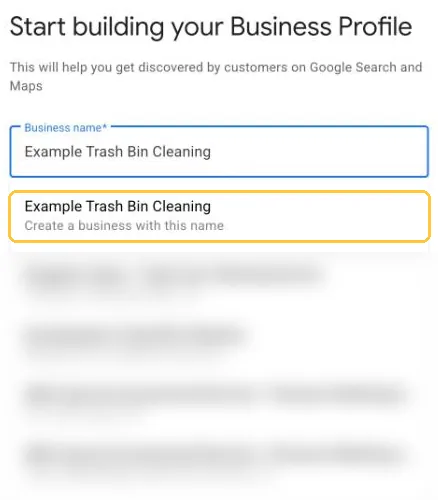
- If your business shows up in the list, pick it and follow the steps to claim it, even if some details are wrong. You fix them after you verify.
- If it isn't listed, click "Create a business with this name".
- If someone else already manages it (an old marketer, a partner who left), Google lets you request ownership from the current owner. You'll see the option when you try to claim it.
Your name has to be your real name. Google's guidelines say it should match what you use on your signs, website and paperwork, and "Including unnecessary information in your business name isn't permitted." So "Bin Bros Trash Can Cleaning Best in Dallas" breaks the rules, and profiles get suspended for it. No city names or service words unless they're really part of your name, no phone numbers, no taglines. "LLC" only if you actually use it on your signs and invoices.
Step 2: Pick your category
Next, type your category in the same screen. This is one of the most important fields on your whole profile, and it's where bin cleaners get stuck: Google has no bin cleaning or trash can cleaning category.
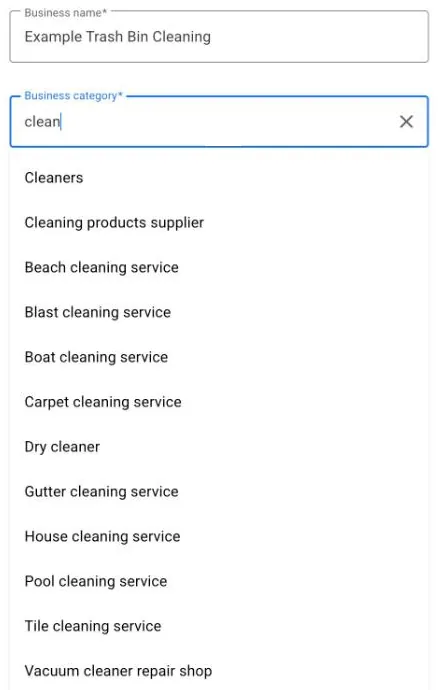
We searched every word a bin cleaner would try. Here's what's there and how we'd use it:
| Category | Should you use it? |
|---|---|
| Pressure washing service | A strong primary category. You pressure wash bins for a living. Zafra Trash Bin Cleaning uses it as its primary, and South Bay Bin Cleaners has it as a second category. |
| Sanitation service | The other strong choice, since you sanitize and disinfect every bin. South Bay uses it as its primary, and Zafra has it as a second category. |
| Waste management service | Close, but it describes the people who haul and process waste, not the people who clean the cans. |
| Garbage collection service | Skip it. You'd show up for people who want trash pickup, and they'll call you. |
| Cleaners, House cleaning service | Skip. These are for cleaning inside homes and offices. |
Either of the first two works. Google's own test: a category should finish the sentence "This business IS a…". Use as few as possible, pick the most specific one that's true, and don't use categories as keywords. Only add a category for work you really do: South Bay also cleans windows, so Window cleaning service is on its profile too. Before you decide, search "trash can cleaning" in your city and look at what the top three map results use.
The setup screen only takes your main (primary) category. You add a second one later in Edit profile. If you change categories after you're verified, Google may ask you to verify again, so pick carefully now.
Step 3: Answer "No" to the storefront question
Google asks: "Do you want to add a location customers can visit, like a store or office?"
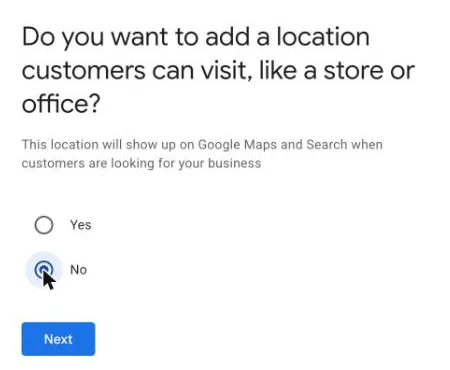
Choose No. Customers never come to you; you go to their curb. That makes you what Google calls a service-area business: your profile shows the areas you serve instead of a street address.
This matters most if you run the business from home. Your home address shouldn't be on your public profile, and with "No" it won't be. Google's guidelines say service-area businesses should hide their address from customers. Two more rules:
- Don't use a virtual office, a mailbox store or a P.O. box as your address. Google doesn't allow virtual offices unless they're staffed during business hours, and profiles get suspended over it.
- A service-area business gets one profile for its whole area. Don't make one per city.
If Google asks for your address at any point, use your real one. Afterward, check Edit profile → Contact (Step 8). Under Business location it should say "No location; deliveries and home services only", like South Bay's does.
Step 4: Add the areas you serve
Next: "Where do you serve your customers? (optional)". It says optional, but don't skip it. Search for each city or ZIP code and click it to add it.
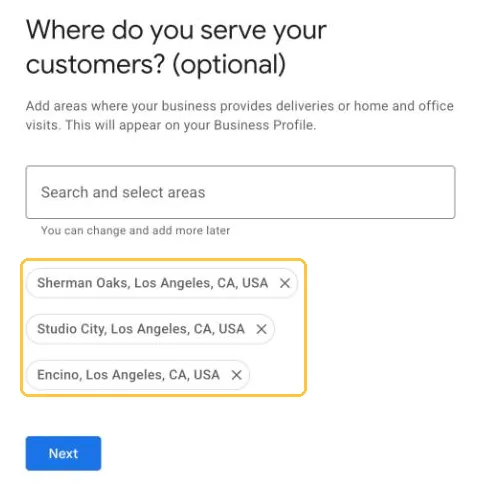
- You get up to 20 service areas. Cities, ZIP codes or neighborhoods. You can't draw a radius.
- Google says your area shouldn't extend more than about 2 hours of driving time from where you're based.
- List the places you actually serve, starting with the ones you most want customers in. South Bay Bin Cleaners lists 15, from Torrance and Redondo Beach to Gardena and Lomita.
- Use Google's name for each place. If a neighborhood doesn't come up, try the name Google uses. South Bay serves Alondra Park, which Google lists as El Camino Village.
- Listing a city doesn't mean you'll rank there. Google still weighs how far a searcher is from where you're based. To reach farther, give each city you serve its own page on your website (see the website checklist).
You can change these later. Google says approved service-area edits can take up to 48 hours to show.
Step 5: Add your phone, website and text chat
"What contact details do you want to show to customers?"
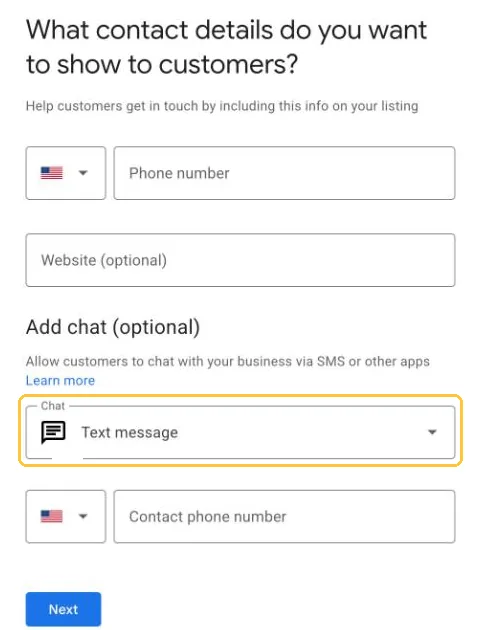
- Phone: a local number you answer, the same one on your truck and website. Google wants a number under your control. No call centers, no numbers that forward somewhere else.
- Website: your own site. Use the page with your prices and booking, not your Facebook page. Google doesn't allow links that send people to social media as your website.
- Chat: pick "Text message" and enter a cell number. A lot of people would rather text "how much for 2 bins?" than call. South Bay got 11 text chats from its profile in five months, on top of 47 calls.
After this, Google walks you through some optional screens and then verification. You can skip anything you don't have yet and add it all later. Most of your profile won't show on Google until you're verified anyway.
Step 6: Verify the profile
Until you prove you run the business, your profile won't fully show on Google, and your photos won't show at all. Google picks which verification methods you get. You can't choose them, and they vary by business. Here are the ones you might see:
| Method | How it works |
|---|---|
| Phone or text | Google calls or texts a code to your business number. |
| You follow steps sent to your email. | |
| Video recording | You record one live video on your phone showing where you are, your equipment, and that you run the business. Often offered to service-area businesses. |
| Live video call | A Google rep watches while you show the same things on a call, during your business hours. |
| Postcard | Google mails a 5-digit code to your address. Not offered to every business. |
If Google asks for a video
This is where most home-based bin cleaners end up. Google's rules: it has to be recorded live on your phone through your Business Profile (no pre-recorded videos), in one continuous take with no cuts, and at least 30 seconds long. Plan the shot before you hit record. For a bin cleaner it goes like this:
- Where you are: start outside and film a street sign or a landmark near your home or shop. Google specifically tells home-based businesses to do this.
- That the business is real: walk to your branded trailer or truck. Show the logo, your pressure washer, the water tank, your branded shirt.
- That you run it: unlock and open the truck or trailer, or start the equipment. A business permit, invoice or utility bill in your business name works too.
Don't film bank, tax or ID numbers, or other people's faces. Google says review takes up to 5 business days. If it's rejected, record again with everything from the first video plus whatever they said was missing.
If you get a postcard
- Don't change your business name, address or category while you wait, or the code won't work.
- Don't request a second postcard. It cancels the first. Most arrive within 14 days and codes expire after 30.
Never give your verification code to anyone. Google says it will never ask you for it.
Step 7: Your dashboard, explained
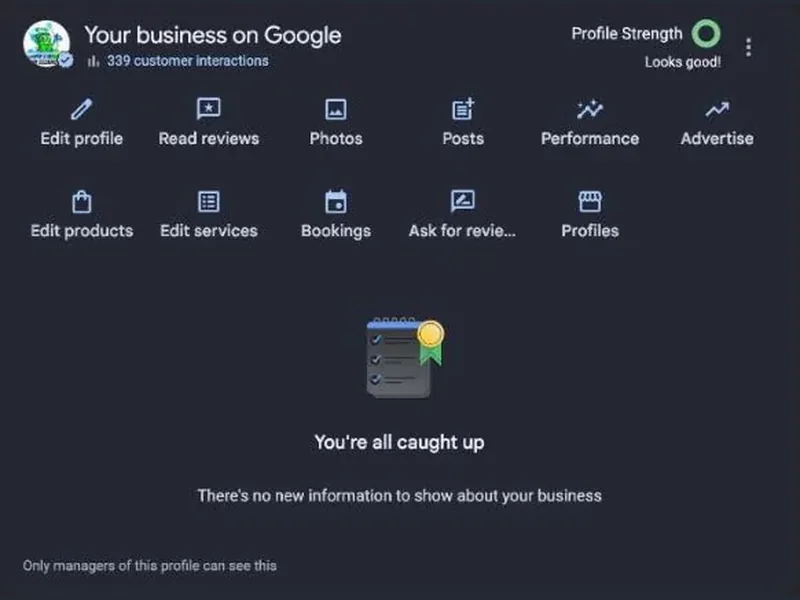
Once you're verified, there's no separate app to learn. Search your business name on Google while signed in to the account that manages it, and your dashboard appears at the top of the results: "Your business on Google". You can also get there from business.google.com.
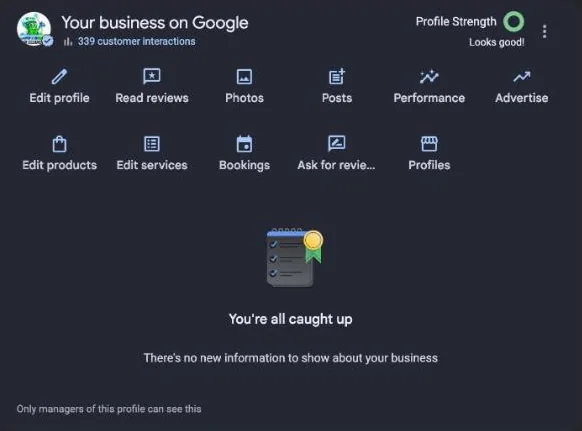
| Button | What it does |
|---|---|
| Edit profile | Everything customers see: name, category, description, phone, website, service area, hours and more (Step 8). |
| Read reviews | Your reviews and the Reply button (Step 12). |
| Photos | Your logo, cover photo and all your photos (Step 10). |
| Posts | Updates, offers and events that show on your profile (Step 11). |
| Performance | How many people found you, the searches they used, and how many called, texted or clicked to your website (Step 13). |
| Advertise | Google Ads. Optional and paid. You don't need it for your profile. If you want ads later, read Google Ads for bin cleaning. |
| Edit products | Built for stores selling physical products. Services (next) are the better fit for bin cleaning. |
| Edit services | Your services with prices and descriptions (Step 9). |
| Bookings | Your online booking link, so customers can book from your profile (Step 8). |
| Ask for reviews | Your review link and QR code (Step 12). |
Profile Strength in the corner tells you whether anything is missing. Aim for "Looks good!". To give a teammate or your marketer access, use the ⋮ menu → Business Profile settings → People and access. Add them as a manager instead of sharing your password.
Step 8: Fill out every tab in Edit profile
Click Edit profile. You'll see five tabs: About, Contact, Location, Hours and More. Go through all five. Every empty field is something a competitor might have filled in.
About: name, categories, description
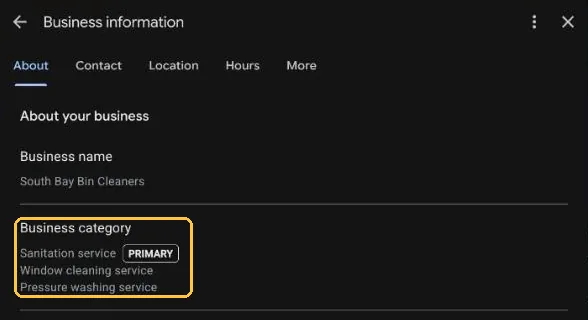
Business category: add your other categories here (like Pressure washing service), or from Edit services. The one marked PRIMARY is your main category.
Description: up to 750 characters. Say what you clean, where, and how, in plain words. Google's rules: no links, and the description is about your business, not prices, promotions or sales. Your prices go in services (Step 9). Use the words customers search, like "trash can cleaning" and "garbage can", but write sentences, not a keyword list. Here's a template to adjust:
[Your Company] cleans trash, recycling and green waste bins at the curb in [your city] and nearby neighborhoods. We come the day your trash is picked up, pressure wash each bin, sanitize it and deodorize it, so you don't need to be home. Choose a monthly or quarterly plan, or a one-time cleaning before a move. We also clean commercial bins and dumpster pads for restaurants, apartment buildings and HOAs. Locally owned. Book online or text us to set up your first cleaning.
Opening date: the month and year you started. South Bay's says January 2025.
Contact: phones, chat, website, social profiles
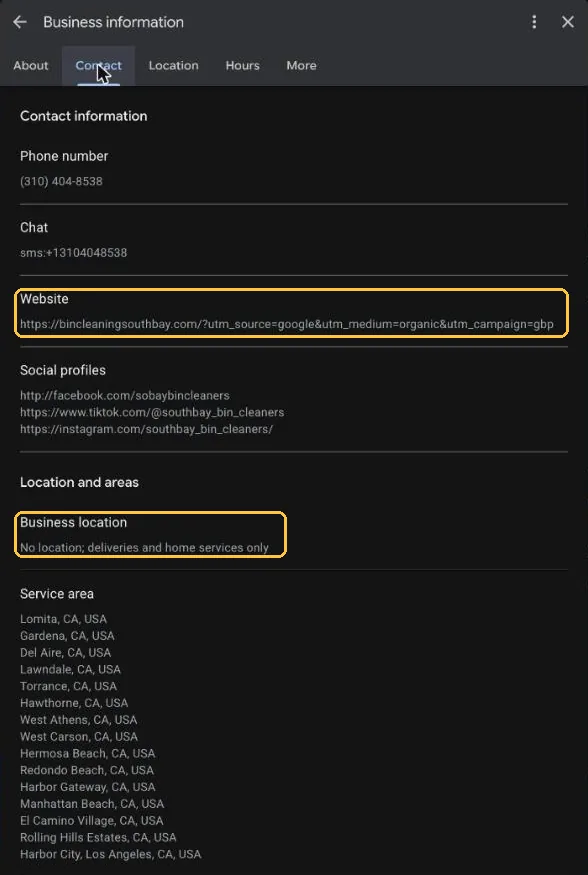
- Phone number: one primary number and optional extra numbers.
- Chat: the text number from Step 5.
- Website: your booking page or homepage. Look at the end of South Bay's link:
?utm_source=google&utm_medium=organic&utm_campaign=gbp. Those tags let Google Analytics count every website visit that came from the profile, so you can see what it's worth. - Social profiles: add your Instagram, Facebook and TikTok so customers can see your work.
- Business location: must say "No location; deliveries and home services only". If it shows your street address, your home address is public. Fix that first.
- Service area: your up-to-20 areas from Step 4.
If you see a blue "Show your online products across Google with Merchant Center" box, it's for stores selling products. You can ignore it.
Booking link
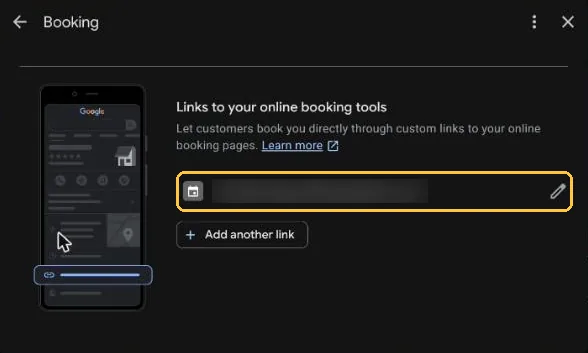
Click Bookings on your dashboard and add the link to the page where customers sign up and pay. It shows on your profile as Appointments, so someone can book without calling you.
Hours
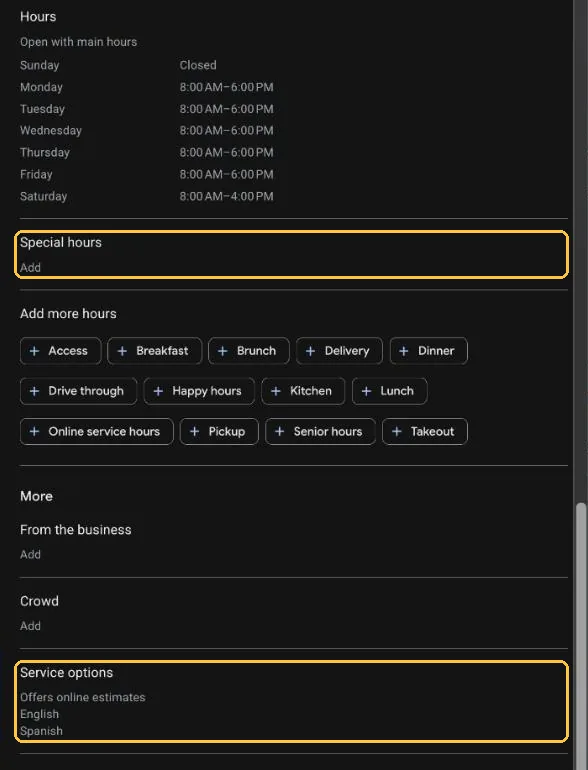
Use the hours someone answers the phone or replies to texts, not just when the truck is out. Use Special hours for holidays, especially around trash schedule changes. The Add more hours buttons (Breakfast, Happy hours, Kitchen) are mostly for restaurants and stores. You can skip them.
More: attributes
The More tab (bottom of the screenshot above) holds short facts customers can see, like "Offers online estimates" or "Appointment required". The list changes depending on your category. Turn on everything that's true. If you serve customers in Spanish (or any other language), say so here. South Bay lists both English and Spanish.
Step 9: Add your services with prices
Click Edit services. Your services are grouped under each category. Google suggests some for each category, and you can add your own with + Add more services.
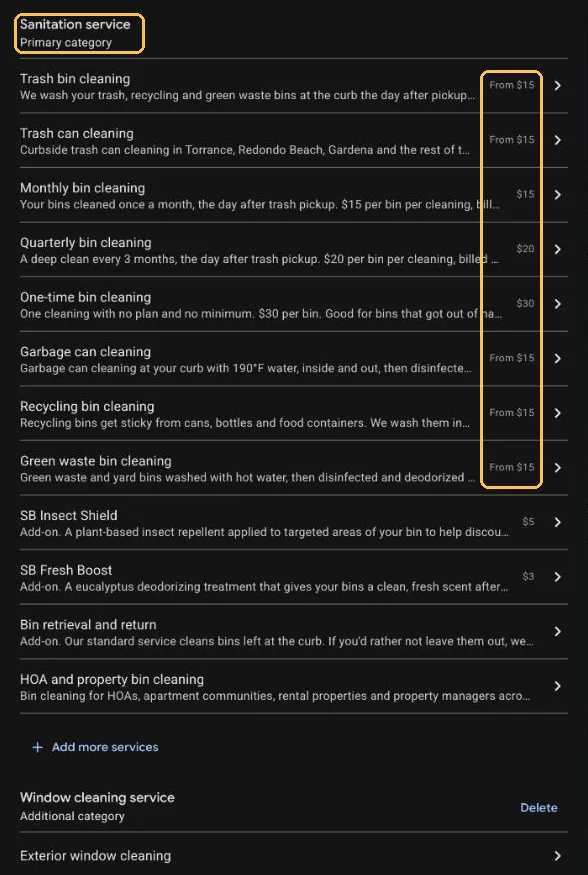
South Bay lists 12 services under Sanitation service: trash bin cleaning, trash can cleaning, garbage can cleaning, recycling and green waste bin cleaning, a monthly, quarterly and one-time plan, two add-ons, bin retrieval and return, and HOA and property cleaning. Trash bin pressure washing sits under Pressure washing service. Notice that "trash bin cleaning", "trash can cleaning" and "garbage can cleaning" are separate services. Those are the different words people search for the same thing.
Click a service to edit it:
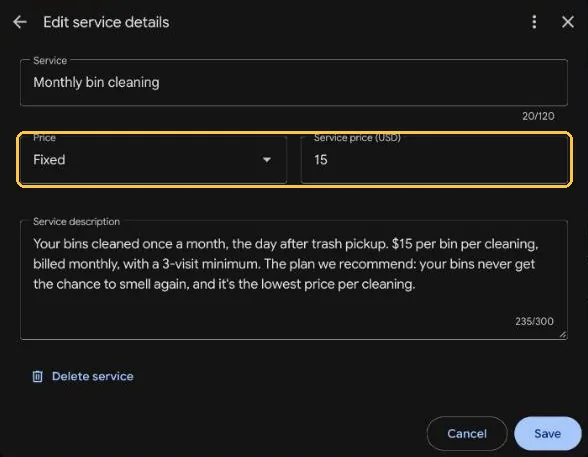
- Service: the name, up to 120 characters. Use the words customers use: "Trash bin cleaning", "Monthly bin cleaning plan".
- Price: choose No price, Free, Fixed or From, then enter the amount. Use Fixed for a plan with a set price ($15 a bin for South Bay's monthly plan) and From when it depends on the plan or the number of bins ("From $15").
- Service description: up to 300 characters. Say how it works and what it costs. South Bay's monthly plan: "Your bins cleaned once a month, the day after trash pickup. $15 per bin per cleaning, billed monthly, with a 3-visit minimum."
Services are the right place for prices on your profile. People shopping for bin cleaning want to know what it costs, and a clear price saves you the "how much?" texts.
Step 10: Upload a logo, a cover and real photos
Click Photos. From here you set your logo and cover photo and add the rest.
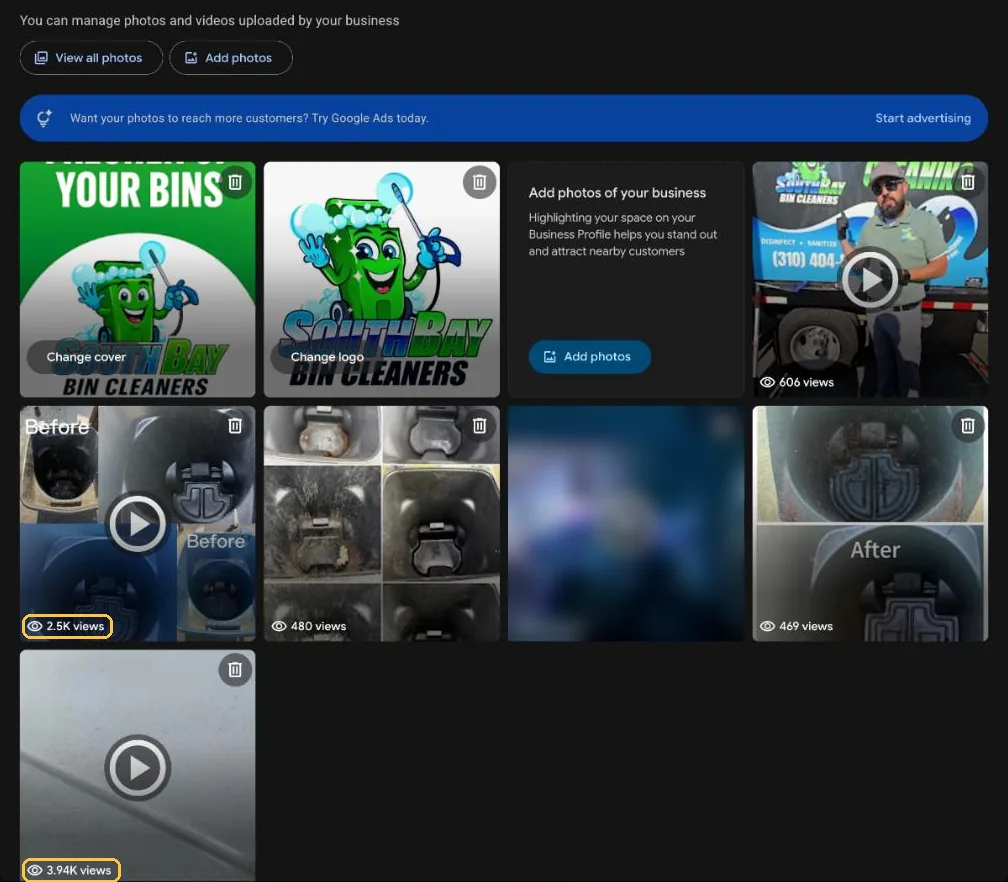
- Logo: your real logo, square.
- Cover: your best photo. Google says it doesn't guarantee the cover shows first, and it can swap in a different photo if the cover is low quality.
- What to add: your truck or trailer, a clean row of bins at the curb, your crew at work, and close-up before-and-afters inside a can. Real photos only: no stock, no AI images.
- Add short videos. South Bay's two most-viewed items are videos, with 3.94K and 2.5K views, while most of its photos have a few hundred. A 20-second clip of a dirty bin getting cleaned is all it takes.
- Google's specs: JPG or PNG, 10 KB to 5 MB, ideally 720 × 720 pixels or larger (250 × 250 minimum). Videos up to 30 seconds and 75 MB.
- Photos only show after you're verified, and new ones can take 24 to 48 hours to appear.
- Add a few new photos every month. The newest show first, and a profile that keeps changing looks like a business that's busy.
Step 11: Post every week (and schedule ahead)
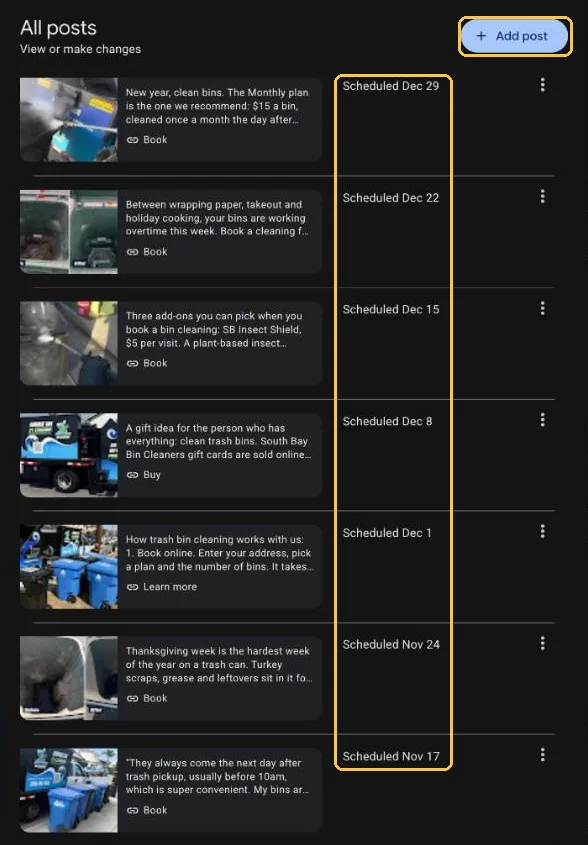
Posts are short updates that show on your profile, a bit like a social post. They're free and take a few minutes. Click Posts to see yours.
Click Add post:
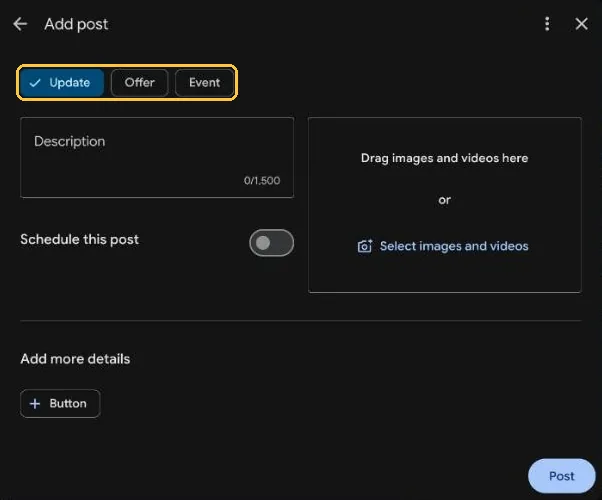
- Update, Offer or Event: Update is the everyday one. Use Offer for a real promotion with dates.
- Description: up to 1,500 characters, but a few short sentences is plenty.
- Photo: always add one. Real photos or a simple graphic.
- Button: add one, like "Book" linking to your booking page.
- Schedule this post: write a month of posts in one sitting and let Google publish them. That's how South Bay posts every week without thinking about it.
Ideas that work for bin cleaning: Thanksgiving week (turkey scraps sitting in the can), gift cards as a holiday present, how your service works in three steps, your add-ons, a line from a real review, a referral credit, and your commercial service for restaurants and HOAs.
Step 12: Get reviews and reply to them
Reviews are one of the main things people compare when they choose between two bin cleaners. Click Ask for reviews to get your link.
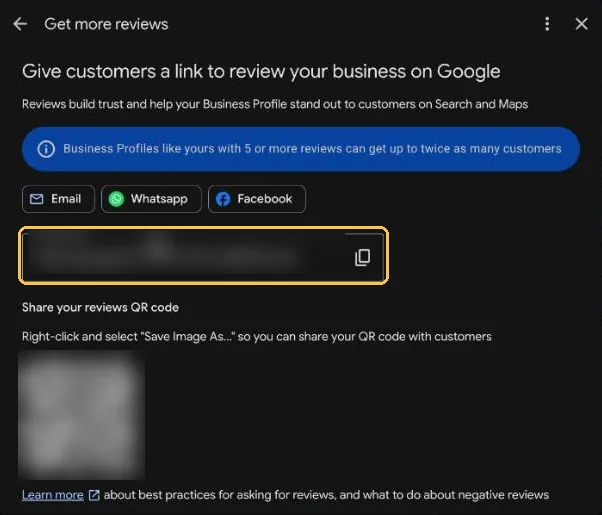
Google's own note on this screen says "Business Profiles like yours with 5 or more reviews can get up to twice as many customers." South Bay Bin Cleaners has 37, with a 5.0 average. How to get there:
- Ask every customer, right after the first cleaning, while the clean can is still fresh. A text with the link works best.
- Put the link everywhere: your booking confirmation, your website, your invoices. Print the QR code on door hangers or a card you leave on the lid.
- Customers need to be signed in to a Google account to leave a review.
What Google doesn't allow, and what gets reviews removed or profiles flagged:
- No discounts, free cleanings or anything else in exchange for a review. "$5 off for a 5-star review" breaks the rules.
- No asking only happy customers. Ask everyone the same way.
- No reviews from yourself, your employees or anyone else with a stake in the business.
- No pressuring anyone to change or remove a review.
Then reply. Click Read reviews:
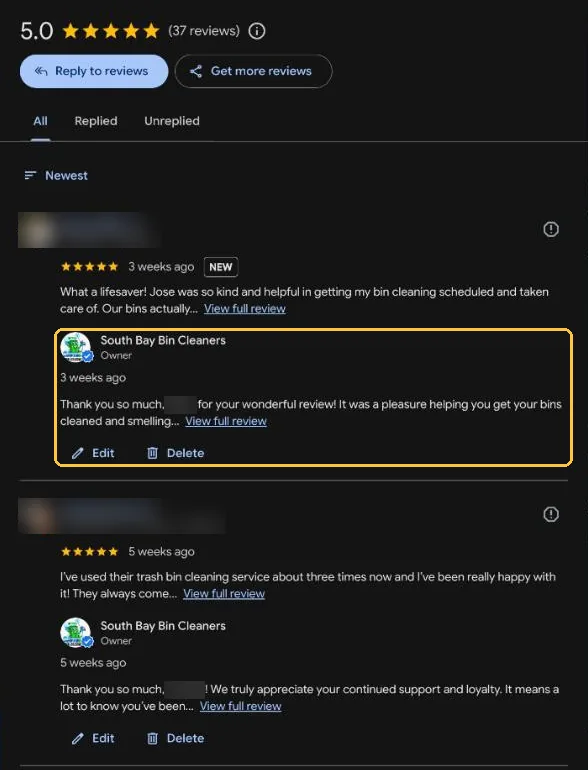
- Thank good reviews briefly, by name, and mention something specific: "Thanks, glad the bins stay fresh between cleanings."
- Answer bad reviews fast, calmly and once. Apologize if you got it wrong, say what you did about it, and offer to talk directly. Future customers will read your reply along with the complaint.
- Don't paste the same thank-you on every review, don't put offers in replies, and never share a customer's personal details.
Step 13: Check your numbers every month
Click Performance on your dashboard. This is where you see whether the profile is bringing in customers. Here's South Bay Bin Cleaners from June to early November 2026.
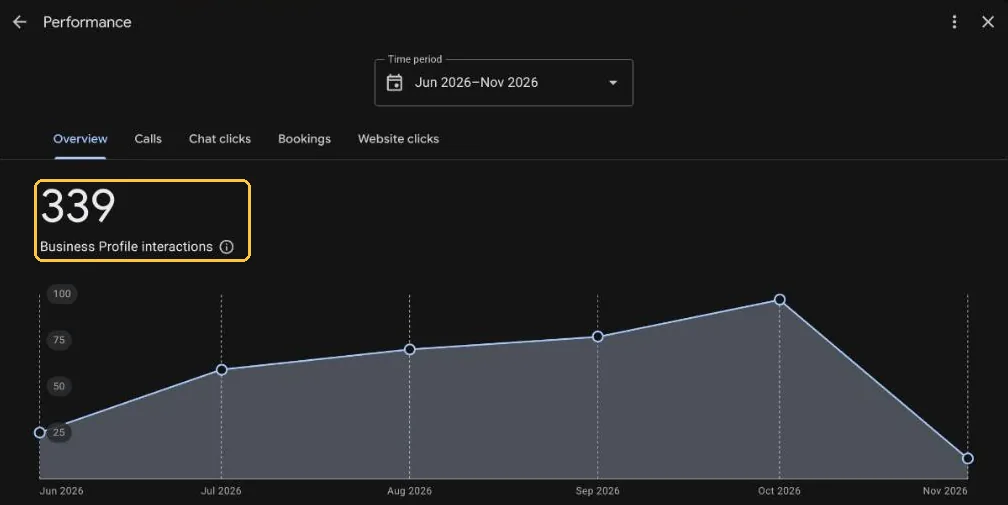
- Business Profile interactions are the people who did something: called, texted, booked or clicked to your website. South Bay's 339 break down into 281 website clicks, 47 calls and 11 text chats. About 83% went to the website, so the website is where most of these customers decide. If yours doesn't show prices and book online, fix that first. See the website checklist.
- The chart by month shows the trend. South Bay's best month was October. November looks low only because the month had just started.
Scroll down to "How people discovered you":
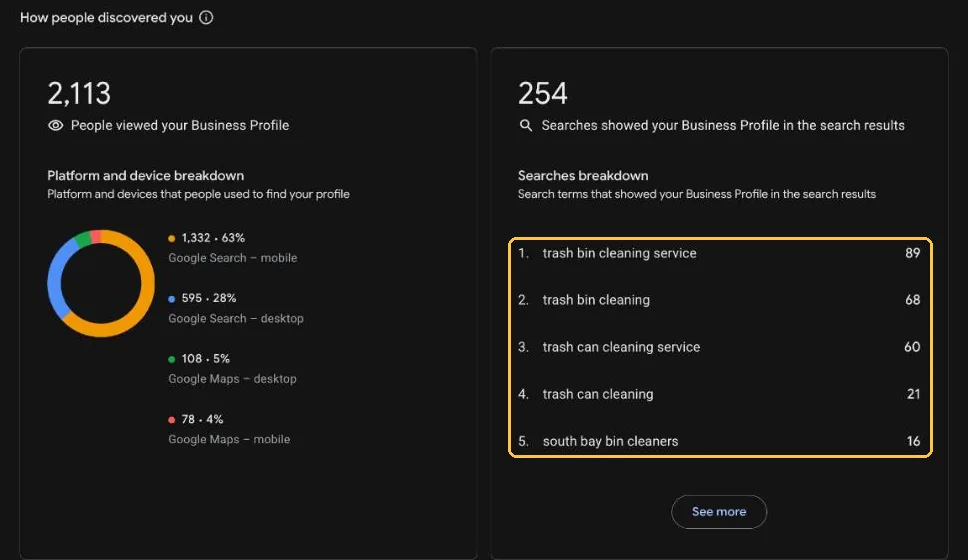
- People viewed your Business Profile: 2,113 for South Bay. 63% were on Google Search on a phone and 28% on Google Search on a computer. Only about 9% came from Google Maps. Most people find you in regular Google results on their phone, so make sure your profile and website work well on a phone.
- Searches breakdown: the actual words people typed. South Bay's top five were "trash bin cleaning service" (89), "trash bin cleaning" (68), "trash can cleaning service" (60), "trash can cleaning" (21) and its own name (16). So of the 254 searches listed, only 16 were people who already knew the business. The rest were people looking for the service. That's the real value of the profile: getting found by people who have never heard of you.
- Use those words. Put the top searches in your services, description and posts, and on your website.
Write down four numbers every month: profile views, calls, chat clicks and website clicks. If they're going up, keep doing what you're doing. If they're flat, look at your reviews, photos and posts first.
Best practices for bin cleaners
- Keep your name, phone and website the same everywhere: Google, your website, Facebook, Yelp and your ChatGPT listing. Matching details make it easy for Google, AI tools and customers to tell it's all one business.
- Build your website to back up the profile. A page for each city you serve, prices in plain text, and online booking. Your profile gets you found, and your website closes the sale. See the website checklist.
- Use the words customers use. Homeowners say "trash can cleaning" and "garbage can cleaning" more than "bin cleaning". Use both in your description, services and posts. Background: trash can vs. bin keywords.
- Get a review from every customer, every week, not in bursts.
- Post weekly and add photos monthly. Schedule posts so it happens even in your busiest weeks.
- Update hours and prices the day they change. Wrong hours or old prices lead to bad reviews.
- Check Performance once a month (Step 13). Calls, texts and website clicks going up means the profile is working.
- Answer messages and calls fast. Someone texting at 8 PM may be texting your competitors too.
Mistakes that get profiles suspended or buried
- Keywords or cities in the business name. Google's guidelines say this can get your profile suspended.
- A virtual office, mailbox store or P.O. box as your address.
- Showing your home address because you answered "Yes" to the storefront question.
- A second profile for another city, or because you lost access to the first one. Request access to the original instead.
- Paying for reviews or trading them with other businesses.
- The wrong category, like Garbage collection service, which brings in calls for trash pickup.
- Prices or links in the description. Prices belong in services.
- Setting it up and never touching it again. A profile with no new photos, posts or reviews for a year can look like a business that closed.
Sources: our own work on South Bay Bin Cleaners’ and Zafra Trash Bin Cleaning’s profiles (Performance data Jun–Nov 2026, captured Nov 10, 2026), and Google’s Business Profile help: Guidelines for representing your business, service areas, categories, editing your profile, verification, video verification, photos, reviews, and Maps fake engagement policy.
Print the free workbook
Worksheet 9 is a printable checklist of every step in this guide, plus what to do every month.
Want this done for you?
We set this up for bin cleaning companies for $230 a month.
More guides
Keep reading
How to market a bin cleaning business: the whole playbook
New: the funnel, reviews, and every offline and digital lever, from EDDM and door hangers to Google Ads, with real numbers.
Read more →
How to claim your ChatGPT business listing
New: claim and verify your business in ChatGPT, step by step, with screenshots.
Read more →
Bin cleaning website checklist
15 things a bin cleaning website needs before you spend a dollar on ads.
Read more →Questions
Common questions
Can a bin cleaning business show up on Google Maps without an address?
Yes. When Google asks “Do you want to add a location customers can visit?”, choose No. That makes you a service-area business: your profile shows the areas you serve, and your address stays hidden.
What Google Business Profile category should a trash can cleaning business use?
There’s no bin cleaning or trash can cleaning category. The two best fits are Pressure washing service and Sanitation service: use one as your primary category and add the other as a second one. Avoid Garbage collection service, which brings in calls for trash pickup.
How many service areas can I add?
Up to 20 cities, ZIP codes or areas. You can’t set a radius, and Google says your area shouldn’t go much past 2 hours of driving from where you’re based.
How do I verify a home-based bin cleaning business?
Google picks the method. Many service-area businesses get video verification: one live, continuous video of at least 30 seconds, recorded on your phone through your Business Profile, that shows a street sign near you, your branded trailer or truck and equipment, and you opening it or a business document. Review can take up to 5 business days.
Can I put my prices on my Google Business Profile?
Yes, in your services. Each service can have a price, like “From $20”, and a description up to 300 characters. Keep prices out of your business description; Google’s guidelines say the description isn’t for prices or promotions.
How do I get more Google reviews for my bin cleaning business?
Click Ask for reviews to get your link and QR code, text the link to every customer right after their first cleaning, and add it to your website and booking confirmations. Don’t offer discounts for reviews, and ask every customer, not just the happy ones.
How do I know if my Google Business Profile is working?
Open Performance on your dashboard. It shows how many people viewed your profile, the searches that showed it, and how many called, texted or clicked to your website. 2,113 people viewed South Bay Bin Cleaners’ profile, which led to 339 calls, texts and website clicks from June to early November 2026.
Do Google Business Profile posts help?
They give people a reason to pick you: current offers, photos and answers to common questions, with a Book button. Schedule a month of posts at a time so they keep going in busy weeks.
Book a demo
See how it works on a call.
Pick a time on Taylor’s calendar. We’ll look at your Google profile, website and booking setup with you, show you how Clean Bin System runs sign-ups, routes and billing, and tell you what we’d fix first. No cost, no pressure.
On the call
- Your Google profile and website, and what’s costing you bookings
- Clean Bin System: online sign-ups, routes built around trash day, and card billing that runs itself
- What it would cost you, and how soon you could be live